Lessons learned, fun discoveries, and interesting notes from a practicing solutions architect.
Sunday, September 9, 2012
Attacking BIG Problems
Some architects, this includes me, can be paralyzed by the sheer enormity of a problem and fall into bad spells of procrastination. Here are the (2) tools I use to break out of those terrible spells.
1. Do the easiest thing first. That way, you're always doing the easiest thing.
Find the easiest / most trivial / obvious thing that needs to be done and do it. Repeat until problem done. It's all about momentum. It's amazing how this approach can warm-up the brain cells and get you moving. I found this advice in my alumni magazine from a wise old engineer. In a way, the tip is a natural form of the problem solving method that was beat into us at Mines: break the problem into manageable pieces, then work them one at a time until you're done.
2. Stop working when things are going well and you know what needs to be done next.
Look for ideal stopping points before fatigue sets in at the end of the workday. Avoid staying late to finish work items. Strive to finish them first thing the next morning. Again, it's all about momentum. It's amazing how this approach positions you for great workdays. By the way, this advice comes straight from Ernest Hemingway (yes, the writer).
Labels:
other
Thursday, May 17, 2012
Find a Mentor
Regardless of our skills or experience, we all need great coaches (mentors). It's the fastest way and often the only way to achieve our professional goals.
Consider this part two of the Fastest Way to Learn.
It's amazing how we can fool ourselves into thinking that we can learn everything on our own and expect to be great practitioners. Mind you, I say this as one of those guys who sincerely believed this. I thought I could knock down any project of any size and be successful… WRONG.
The reason this is not true can be explained via analogy.
Let's say your friend Joe is the smartest guy you know. Joe decides he wants to become a plumber. So Joe goes to Amazon.com and purchases the best plumbing guides ever published. Joe studies those guides. Joe goes further and aces the written exams testing his knowledge. My question: Would you want Joe doing the plumbing in your new home? No way. Joe needs the practical application of this knowledge by doing actual jobs. Joe's fastest path to get this knowledge is to serve as an apprentice to a master plumber.
The same is true for an IT architect / specialist. Not only do you need the book knowledge, you need the practical application of this knowledge. Studying the latest technologies / methodologies until you're blue in the face will not get you there. This knowledge comes by doing actual IT projects through their full life cycle (see previous post). Only then, does that great knowledge actually 'cook-in.'
Here is the great multiplier: You must serve and apprentice under an accomplished IT architect / specialist on those projects. There simply is no faster way to reach the highest levels of our profession. Be aware that those who forge on without a mentor usually fail to realize their potential as a professional.
On a personal note, cherish your apprenticeship and learn all you can. After a year or so, your mentor will be long gone, and you'll be the technical lead remembering the good ol' days when someone else had all the headaches.
Lesson learned: To realize your potential as a professional, serve and apprentice under an accomplished IT architect / specialist.
Labels:
lesson
Tuesday, May 8, 2012
Deployment Management
Like many IT shops, we have a complex operational environment consisting of dozens of servers deployed across many network layers. Our production system is young, went live in July last year, and has healthy ongoing development activity. More, we have another major production system going live July this year. Critical to our success is intelligently managing our environments, code bases, and deployments. Here's our current strategy.
Three System Environments
- DEV - Contains latest code with a copy of production data. Shared sandbox for our developers.
- TEST - Contains copy of production code and data. Used as staging area for monthly service release, user training, and for troubleshooting current production issues.
- PROD - Production code and data.
Two Code Branches
- develop - Latest developer tested code deployed to DEV environment.
- master - Current code deployed to PROD environment.
Early this year, we successfully transferred the code base / maintenance responsibility from the vendor to our team. We loaded the system's code base into Git and as per best practice, isolated the current deployed production code (master branch) from the ongoing development work (develop branch). We use the centralized workflow model on the develop branch and the dictator (Deployment Manager) model on the master branch. This is done as per the long-running branches workflow described in Pro Git.
Developer Procedures
- Monthly Deployment Schedule - The big picture (see previous post).
- Commit Guidelines - Timely commits to Git with well formed commit messages.
- Standard Coding Deployment Workflow - Coding in the develop branch and DEV environment.
- Version Numbering - Numbering to fit our processes.
- Request Workflow - Working with the IT Request System.
The procedures are simple one page guides (KISS). They're designed to keep us (about nine of us developers) from stepping on one another and to minimize management overhead. Please note that these procedures continue to evolve to fit the unique and dynamic characteristics of our team / project.
So putting it all together, we have developers making incremental commits (1) to the develop branch for the upcoming monthly production release. Then monthly, the Deployment Manager updates the master branch (2) with that month's service release. Occasionally, the Deployment Manager updates the master branch (3) with an urgent hot fix from the develop branch code stream.
Labels:
example
Friday, April 27, 2012
Deploy Early and Often
We've heard it before - a common practice of successful IT teams is that they deploy early and often. Easy to say, but how might a geographically dispersed team of a dozen or so do this?
Monthly Deployment Schedule
We took a multiple step approach to employ this practice:
- Set a predictable well-known deployment schedule;
- Adopt and aggressively use a modern SCM system (see previous post);
- Leverage existing defect / change management system;
- Establish great development environment that mirrors production; and
- Establish procedures to minimize code conflicts and management overhead.
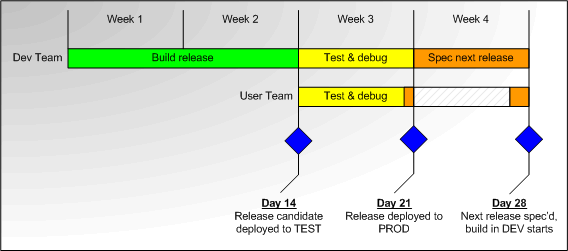
As per below figure, we chose to go with a monthly deployment schedule. Key factors that played into this decision:
- Follow best practice - deploy early and often.
- Be respectful of user's time - exhausted from release one and have real jobs to do.
- Keep it simple - developers work in one environment / one branch at a time.
- Deliver product monthly - increase user satisfaction.
Monthly Deployment Schedule
14 Deploy production candidate to TEST
21 Deploy tested candidate to PROD
28 Finalize content of next production candidate
User Schedule
15-21
a) Test production candidate until ready for production use
b) Select areas of focus / critical items for next release
28 Review, update, and approve spec updates for next release
Developer Schedule
1-14 Code, test, and deploy assignments in DEV
15-21 Fast turn-around bug-fixes in TEST, and final updates to spec’s
22-28 Get new release assignments, draft spec updates
Field Notes: So far so good. We've completed two monthly cycles here. User satisfaction is way up. As the Deployment Manager, had to invest significant time to get our programmers skilled-up in Git and versed in our ever evolving procedures. But we're getting there, delivering code, and having fun.
Labels:
example
Saturday, February 18, 2012
Why Git?
OK you architect types, here's a classic solution fit statement... enjoy.
Why Git
Here at the State and in past lives, we used a number of SCM systems. Ultimately, our Department settled on Git for the following reasons:
Git Resources
git - Git Home
msysgit - Git for Windows (core)
TortoiseGit - Git Windows Explorer Integration
Recommended Doc's
Why Git
Here at the State and in past lives, we used a number of SCM systems. Ultimately, our Department settled on Git for the following reasons:
- Standard - Git is the long overdue successor to CVS and has quickly become the defacto standard for SCM. As such, great documentation and extensive tooling are widely available.
- Best Practice - Old school limitations like check-out locking are long gone. High value features from years of SCM system evolution are built-in.
- Cross Platform - Our systems, code, and tools span multiple platforms. As such, we require an SCM that plays well across platforms.
- Low Admin Overhead - Git is easy to setup and maintain. Some SCM systems had great capabilities but extraordinary administrative requirements (i.e. configure / maintain multiple large products across multiple servers) - this is not workable for small teams.
- Ideal Licensing - An open source SCM eliminated hairy licensing issues. For example, proprietary SCM's had strict remote access licensing requirements; making working with outsourced resources difficult.
- Low Cost - No licensing fees.
Git Resources
git - Git Home
msysgit - Git for Windows (core)
TortoiseGit - Git Windows Explorer Integration
Recommended Doc's
Pro Git - The book
Saturday, January 21, 2012
Indexing Documents with Solr
Apache Solr is great at indexing thousands and thousands of office documents (Word, Excel, PDF, etc.). But where's the handy tool you use to upload all those documents to Solr for indexing? You have to write it friend. Ahh... the joys of open source! As such, we wrote one. It's working great here at the State. It's been in production running hourly over the last couple of months, and we just completed a substantial upgrade last week.
Here it is: sinject v1.3.
Like Solr, Sinject is under the Apache license. Enjoy. If you find it useful or can offer some advice, drop us a note.
Core of Sinject - Submitting Files to Solr
(see earlier post for info about our initial experience with Apache Solr)
Low tech search tags: How to index office documents using Solr, how to upload office documents using Solr, how to index rich text documents using Solr, how to upload PDF documents to Solr, how to upload documents using Solr Cell, Solr document uploader, Solr PDF uploader, Solr rich document crawler, Solr cell sample code, example of using Solr cell.
Here it is: sinject v1.3.
Like Solr, Sinject is under the Apache license. Enjoy. If you find it useful or can offer some advice, drop us a note.
Core of Sinject - Submitting Files to Solr
- Get the target file's unique id (inode) and other info:
@file_info = stat($filepath);
$inode = $file_info[1]; - Stage the file to be indexed (eliminate issues with bad filenames):
# deal with possible quotes in filepath
$filestring = $filepath;
$filestring =~ s/'/'\\''/g;
# copy the file to a temp file w/o weird ch's
# (retain the file's mod date)
$cmdstring = "cp -p '$filestring' " . "tempfile";
# do it!
$cmdoutput = `$cmdstring`; - Submit file to Solr indexing engine (remember to escape troublesome literals):
# Solr upload and index file command
$cmdstring = "curl \"$SOLR_URL/update/extract?" .
"literal.id=$inode" .
"&literal.filename=" . uri_escape($filename) .
"&literal.filelink=" . uri_escape($filelink) .
"&literal.filetype=$filetype" .
"&literal.filedate=$filedate" . uri_escape($timesuff) .
"&commit=false\" -F \"myfile=\@tempfile\"";
# do it!
$cmdoutput = `$cmdstring`;
# check for successful result
if ($cmdoutput =~ m/<lst name="responseHeader"><int name="status">0<\/int>/) {
# success - move on to next file
} else {
# fail - log failure, then move on to next file
} - Don't forget to commit the updates (i.e. every 100 or so):
# Solr commit command
$cmdstring = "curl '$SOLR_URL/update' -H " .
"\"Content-Type: text/xml\" --data-binary " .
"'<commit/>'";
# do it!
$cmdoutput = `$cmdstring`;
# use same successful result check as above...
(see earlier post for info about our initial experience with Apache Solr)
Low tech search tags: How to index office documents using Solr, how to upload office documents using Solr, how to index rich text documents using Solr, how to upload PDF documents to Solr, how to upload documents using Solr Cell, Solr document uploader, Solr PDF uploader, Solr rich document crawler, Solr cell sample code, example of using Solr cell.
Labels:
tool
Friday, November 4, 2011
Going Solr
Over the last couple of weeks, we whipped-up an enterprise search site using Apache Solr. It was a fantastic experience. Solr is impressive. My first proper exposure to full text search (FTS) technology was via its inclusion in a recent version of PostgreSQL (see earlier post). I quickly learned that incorporating FTS does wonders for user satisfaction. So upon discovering the large number of public websites that are Solr Powered, we had to take Solr for a spin ourselves. We were not disappointed.
Some interesting notes about our experience:
20 Jan 2012 Update - Posted the detailed 'how-to' for indexing office documents with Solr (source code and all). Enjoy.
Some interesting notes about our experience:
- Solr is not a turn-key solution; it's a search engine for a solution you create.
- Doing the tutorial was critical to understanding Solr.
- XSLT worked great for rendering Solr's XML results.
- Some helpful documentation sources we found:
o Apache Solr (tutorial and presentations);
o Lucid Imagination (lucidworks ref guide); and
o w3schools.com (xslt tutorial). - Solr is lightning fast.
- Solr is packed with enterprise features. However, like most open source tools, you must have an adventurous spirit to realize them.
- Jetty makes deploying web / app servers simple. Launching the Solr example app was literally a one-liner. Incredible.
20 Jan 2012 Update - Posted the detailed 'how-to' for indexing office documents with Solr (source code and all). Enjoy.
Labels:
tool
Subscribe to:
Posts (Atom)