Wednesday, July 31, 2013

Git WinRM Automatic Deployment

The Challenge - Give development teams the ability to deploy their applications simply and in real-time without giving them administrative access to the destination Windows and Linux servers.

The Solution - A professional Git based deployment system; like that you find on GitHub, Heroku, and other leading cloud services. This solution goes a step further by providing the ability to deploy to Windows servers using Windows domain authentication and WinRM.

The Benefits - Lightning fast, easy to use, secure, reliable, and accurate; no opportunities for accidental installation errors; and with perfect history, easy to snap-back to previous deployments.


How It Works

  1. User checks-out the desired deployment branch of their local repository
    (dev for development enviro, test for test enviro, etc.)
  2. User copies the deployment files to their local repository
  3. User enters a descriptive message regarding this deployment and commits their changes
  4. User pushes their changes to the remote repository
  5. Git hook in the remote repository examines branch being updated and determines the destination server
  6. Git hook issues windows remote command to execute installation script on the destination server
    (issues SSH remote command for Linux servers)
  7. Installation script on the destination server retrieves the latest deployment files from the remote repository using Git
  8. Installation script installs the files
  9. Installation script emails the results which include the user’s identity and commit message

Technologies and their Roles

  • Git - Deployment engine, file transport, and version control
  • Cygwin - Deployment hub, SSH server, and Linux / Windows authentication integration
  • WinRM - Secure shell services for Windows
  • OpenSSH - Secure shell services for Linux
  • Python - Installation scripts that are easy to read / maintain / extend

Architecture Notes

  • Made extraordinary effort to keep setup simple as possible with minimal customization - focus on leveraging core strengths of existing proven products
  • One shared repository per application, with separate branches for each environment
  • Developer workstations use a default install of Git
  • Developer workstations access remote repository on Deployment Server using SSH keys for a special deployment user - password is never shared
  • Deployment server uses default Cygwin install with the OpenSSH server and Git packages
  • Deployment server setup to run OpenSSH server as the special deployment user
    (see Cygwin reference below)
  • Deployment server configured to disallow shell access / constrain developers to Git commands only
    (see Pro Git reference below)
  • Deployment server’s remote repository includes simple post-update hook
    (see sample included with the IIS Web Deployer script)
  • Special deployment user is given administrator authority on destination server
  • Destination servers use the OS’s built-in remote services technology, using their defaults
  • Destination servers use a default install of Git
  • Destination servers require installation script for the application being deployed
    (see IIS Web Deployer script)

References

Updates since original posting:
2013.11.06 - Corrected reference for Cygwin OpenSSH setup and added backup copy
2013.10.31 - Improved post-update Git hook example to show IP of the deployer
2013.08.22 - Improved interaction with Git remote repository 

Tuesday, October 16, 2012

Test in Different Dimensions

This is the way I visualize the testing of large systems.

  1. Unit testing comprises one dimension, where programmers test their code with all their might and tools (boundary, failure, code coverage, etc.). Unit testing is done continuously by programmers as code changes.
  2. The second dimension is component testing. Large systems are comprised of a collection of components that deliver different areas of functionality (reporting, messaging, data translation, etc). Component testing is done to make sure each component meets the terms of its interfaces to provide its area of functionality. This testing usually takes place after the completion of coding for each component and is done by technically skilled testers / programmers.
  3. The third dimension is system testing. This is black-box testing using real end-user business scenarios for test cases. Test cases are created for each path described in the system's use cases (one user, one sitting variety). Additionally, long running test cases are created that take system objects (customer, product, document, etc.) through their life-cycles (multi-user, multi-sitting variety). This testing usually takes place after the components are assembled together and is best done by business end-users.
By testing in these (3) dimensions, we form a virtual net that catches system bugs. Pulling this net through the system makes it very difficult for major bugs to sneak through. This testing approach is old school, but incredibly effective and efficient. I've personally used it multiple times to successfully deliver large systems to customers. Now, it's your turn.

Lesson learned: For the most efficient delivery of non life-critical systems, test systems in increasing levels of scope where each level tests a different dimension of the system.

Thursday, October 4, 2012

Poor Man's Job Runner (pmjrunner)

Do you work with batch programs new and old? Do these programs reside on different servers / platforms? Do you want to execute these programs in sequence without gaps, and honor the dependencies between them? Do you want the console output of these jobs automatically logged, organized, and rotated? When a program advents, do you want an easy way to restart / finish the sequence without worrying about missing steps or breaking their dependencies? Do you want to do all of this by editing one simple config file?

If the answer is yes, give this tool a try. We've been using it in production for over a year now. Very nice... especially when batch programs misbehave.


Introducing pmjrunner

pmjrunner is short for Poor Man's Job Runner (download). It's designed to be used in combination with your OS's default scheduler to provide for the intelligent execution or restart of a sequence of batch programs that have dependencies between them. Used in combination with a tool like SSH, pmjrunner can be used to execute a sequence of batch programs across different nodes and OS's. And yes, it runs great on both Linux and Windows.

For more on how it works, view the comments in pmjrunner.pl (or run it using the -h option). See the README.txt for setup info.

Updates since original posting:
v1.4.4 2012.12.14
v1.4.3 2012.10.26
v1.4.2 2012.10.10

Low tech search tags: How to execute sequence of batch programs, open source job runner, open source job scheduler, simple job scheduler, lightweight job scheduler, cross-platform job scheduler.

Sunday, September 9, 2012

Attacking BIG Problems


Some architects, this includes me, can be paralyzed by the sheer enormity of a problem and fall into bad spells of procrastination. Here are the (2) tools I use to break out of those terrible spells.

1. Do the easiest thing first. That way, you're always doing the easiest thing.

Find the easiest / most trivial / obvious thing that needs to be done and do it. Repeat until problem done. It's all about momentum. It's amazing how this approach can warm-up the brain cells and get you moving. I found this advice in my alumni magazine from a wise old engineer. In a way, the tip is a natural form of the problem solving method that was beat into us at Mines: break the problem into manageable pieces, then work them one at a time until you're done.

2. Stop working when things are going well and you know what needs to be done next.

Look for ideal stopping points before fatigue sets in at the end of the workday. Avoid staying late to finish work items. Strive to finish them first thing the next morning. Again, it's all about momentum. It's amazing how this approach positions you for great workdays. By the way, this advice comes straight from Ernest Hemingway (yes, the writer).

Thursday, May 17, 2012

Find a Mentor

Regardless of our skills or experience, we all need great coaches (mentors). It's the fastest way and often the only way to achieve our professional goals.

Consider this part two of the Fastest Way to Learn.


It's amazing how we can fool ourselves into thinking that we can learn everything on our own and expect to be great practitioners. Mind you, I say this as one of those guys who sincerely believed this. I thought I could knock down any project of any size and be successful… WRONG.

The reason this is not true can be explained via analogy.

Let's say your friend Joe is the smartest guy you know. Joe decides he wants to become a plumber. So Joe goes to Amazon.com and purchases the best plumbing guides ever published. Joe studies those guides. Joe goes further and aces the written exams testing his knowledge. My question: Would you want Joe doing the plumbing in your new home? No way. Joe needs the practical application of this knowledge by doing actual jobs. Joe's fastest path to get this knowledge is to serve as an apprentice to a master plumber.

The same is true for an IT architect / specialist. Not only do you need the book knowledge, you need the practical application of this knowledge. Studying the latest technologies / methodologies until you're blue in the face will not get you there. This knowledge comes by doing actual IT projects through their full life cycle (see previous post). Only then, does that great knowledge actually 'cook-in.'

Here is the great multiplier: You must serve and apprentice under an accomplished IT architect / specialist on those projects. There simply is no faster way to reach the highest levels of our profession. Be aware that those who forge on without a mentor usually fail to realize their potential as a professional.

On a personal note, cherish your apprenticeship and learn all you can. After a year or so, your mentor will be long gone, and you'll be the technical lead remembering the good ol' days when someone else had all the headaches.

Lesson learned: To realize your potential as a professional, serve and apprentice under an accomplished IT architect / specialist.

Tuesday, May 8, 2012

Deployment Management

Like many IT shops, we have a complex operational environment consisting of dozens of servers deployed across many network layers. Our production system is young, went live in July last year, and has healthy ongoing development activity. More, we have another major production system going live July this year. Critical to our success is intelligently managing our environments, code bases, and deployments. Here's our current strategy.


Three System Environments
  • DEV - Contains latest code with a copy of production data. Shared sandbox for our developers.
  • TEST - Contains copy of production code and data. Used as staging area for monthly service release, user training, and for troubleshooting current production issues.
  • PROD - Production code and data.
Except for a shared component or two, these are full end-to-end environments. Usually, a team can manage with just two such environments. We were forced into three since we had to branch the code after go live to implement major new legislation that went into effect six months later. So we needed an environment to support current production (TEST), and one to support all the new long-running development work (DEV).


Two Code Branches
  • develop - Latest developer tested code deployed to DEV environment.
  • master - Current code deployed to PROD environment.
Early this year, we successfully transferred the code base / maintenance responsibility from the vendor to our team. We loaded the system's code base into Git and as per best practice, isolated the current deployed production code (master branch) from the ongoing development work (develop branch). We use the centralized workflow model on the develop branch and the dictator (Deployment Manager) model on the master branch. This is done as per the long-running branches workflow described in Pro Git.

Developer Procedures
The procedures are simple one page guides (KISS). They're designed to keep us (about nine of us developers) from stepping on one another and to minimize management overhead. Please note that these procedures continue to evolve to fit the unique and dynamic characteristics of our team / project.

So putting it all together, we have developers making incremental commits (1) to the develop branch for the upcoming monthly production release. Then monthly, the Deployment Manager updates the master branch (2) with that month's service release. Occasionally, the Deployment Manager updates the master branch (3) with an urgent hot fix from the develop branch code stream.

Friday, April 27, 2012

Deploy Early and Often

We've heard it before - a common practice of successful IT teams is that they deploy early and often. Easy to say, but how might a geographically dispersed team of a dozen or so do this?

We took a multiple step approach to employ this practice:
  1. Set a predictable well-known deployment schedule;
  2. Adopt and aggressively use a modern SCM system (see previous post);
  3. Leverage existing defect / change management system;
  4. Establish great development environment that mirrors production; and
  5. Establish procedures to minimize code conflicts and management overhead.
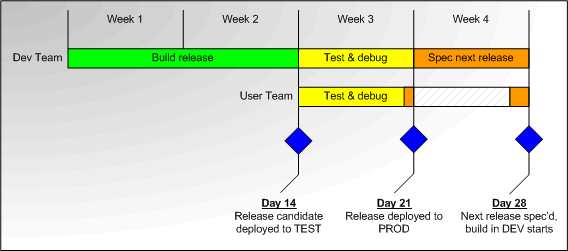
As per below figure, we chose to go with a monthly deployment schedule. Key factors that played into this decision:
  • Follow best practice - deploy early and often.
  • Be respectful of user's time - exhausted from release one and have real jobs to do.
  • Keep it simple - developers work in one environment / one branch at a time.
  • Deliver product monthly - increase user satisfaction.

Monthly Deployment Schedule
14 Deploy production candidate to TEST
21 Deploy tested candidate to PROD
28 Finalize content of next production candidate

User Schedule
15-21
a) Test production candidate until ready for production use
b) Select areas of focus / critical items for next release
28 Review, update, and approve spec updates for next release

Developer Schedule
1-14 Code, test, and deploy assignments in DEV
15-21 Fast turn-around bug-fixes in TEST, and final updates to spec’s
22-28 Get new release assignments, draft spec updates

Field Notes: So far so good. We've completed two monthly cycles here. User satisfaction is way up. As the Deployment Manager, had to invest significant time to get our programmers skilled-up in Git and versed in our ever evolving procedures. But we're getting there, delivering code, and having fun.